
I’ve been using WordPress for quite awhile. Whether for my own blogs or blogs belonging to friends, I’d hazard that I’ve installed and configured nearly 100 WordPress installations over the years. Over the course of spending all that time, I’ve learned a thing or two about how to get WordPress dialed in, and you can knock most of them out while you’re waiting on a sufficiently complicated espresso-based beverage at Starbucks™.
Now, let’s be clear - I’m not going to tell you to come up with a clever title for your spiffy new blog or how to get gobs and gobs of Internet groupies to throw their underwear at you. These are things that most folks miss the first time around and end up realizing a couple of weeks into it that they need to be fixed.
Here they are, in order of made-up importance:
Change your Freaking Permalink Structure
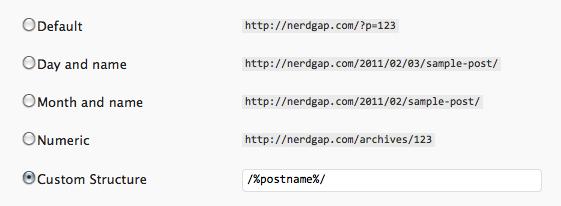
Click “Settings”, then “Permalinks” to access this setting. The default WordPress behavior, for some inexplicable reason, is to have permalinks (that is, links to specific posts) formatted like this: http://www.foo.com/?p=12345 where 12345 is the internal ID for the post. This is not only ugly, but it’s also uninformative. The most common structure in my experience is “Day and name”, which will format the URL so it contains the year, month and date the post was published, along with it’s “slug”, which is made up of readable words that describe the post to users (and search engines). Pick any of these that you want, but don’t use the default. Here’s what it looks like for my little blog here:
Rename the Freaking “Uncategorized” Category
Click “Posts”, then “Categories” for this one. By default, WordPress contains one category for posts called “Uncategorized”. I can’t tell you how many times I’ve been reading a blog and see that 90% of a blog’s posts are categorized using this default (and, incidentally, useless) category. WordPress won’t let you delete this category, but you can rename it:
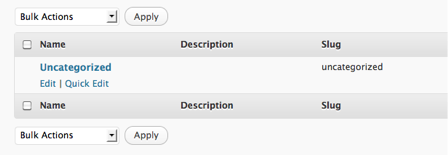
- Place your mouse over the word “Uncategorized”
- Click “Quick Edit”
- Type in some word that generally describes the type of content that might appear on your blog - use uppercase for the name and lowercase for the slug.
Fix Your Freaking Dates and Crap
Click “Settings”, then “General” to access this section. Again, WordPress defaults are a little wonky, this time regarding dates and times and their respective formats. We’ll do these rapid fire since some of you may want to leave them as is and modifying them will depend somewhat heavily on where you live:
- Change the Timezone drop-down to whatever your timezone is.
- Change the Date Format and Time Format to what’s right for you and your fancy home country.
- Change the Week Starts On to Sunday if you want (which I do).
Install and Enable Freaking Akismet
This only applies if you are going to have comments enabled on your blog (and you aren’t using a third-party commenting system like Disqus or IntenseDebate). Akismet is a comment spam filtering service run by the folks at Automattic. Each time a comment is posted, it’s handed off to their server for close inspection for known spammy bullcrap. It’s a really nice service that’s free and dumbass easy to set up. Here’s how you do it:
- Click “Plugins”, then “Add New”
- Type “Akismet” in the little search field
- The plugin you want is simply called “Akismet” (there are several other plugins with that word in the name that are add-on’s to Akismet, but not the genuine article). Click “Install Now”.
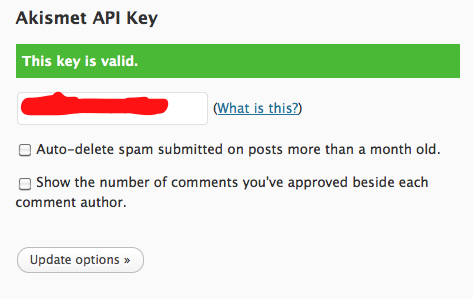
- Once you install it, the plugin will tell you that you need an API key to complete the setup. Visit Akismet.com and sign up for a free account to get your API key, then go back to your Akismet config and shove it in there:
Get a Freaking Caching Plugin
Without getting to into the techie dorkiness, caching plugins help make your blog faster. Each time somebody visits your blog, by default it must make several dozen database queries in order to gather all the data necessary to build the page. A good caching plugin will save all of this data the first time it’s retrieved and use that for subsequent requests instead of accessing the database each time (which is much slower).
There’s a somewhat persuasive argument to be made that most low-traffic blogs don’t really need a caching plugin because the software is fast enough to perform just fine without it in that instance. I believe that most blogs will benefit from intelligent caching, so hence it’s inclusion in this here list.
Now, we’re going to install WP Super Cache because I’ve used it for years and it’s really good. If you have another caching plugin that you like more, then install that one instead, Mr. Know-it-all. Anyway, here goes:
- Click “Plugins”, then “Add New”
- Search for “WP Super Cache”
- It’ll be the first result, so click “Install Now”
- After the installation and activation, you’ll see a big ass red bar across the top that says you need to activate the plugin. It should have a link to the page where you need to go.
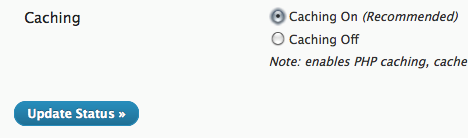
- Once you get there, click “Caching On”, then “Update Status”:
WP Super Cache offers a buttload of additional controls and options that you’re more than welcome to dink around with if you’re feeling sassy, but this is enough to get you going.
A Bunch of Tiny Freaking Tweaks
Here are a handful of other changes to make that are quick and easy:
In Settings > Writing, enable the XML-RPC option if you plan on publishing to this blog from an app or device other than the WordPress admin.
In Users > Your Profile, add your first and last name, then change the “Display name publicly as” option to whichever you like best.
Sign up with Feedburner and follow the integration instructions for WordPress.
Get a Freaking Decent Theme
Premium WordPress themes make your blog much easier to manage and customize. And, many free themes are poorly coded and impossible to customize without having to dink around with CSS and PHP. This blog runs on the excellent Thesis theme, and I’ve also had great experiences with the Headway theme.
So there you have it. Plow through that list of stuff and you’ll have a properly configured WordPress blog in no time at all. Enjoy your espresso-based beverage and leave a comment if you think I left something out!
Photo by Stewsnews



This is just what I was looking for. I’m an avid Tumblr user but wanted to build a more professional (and stable) place to hold my writing and photography on WordPress. I’ve used Textpattern up until recently as it seems to have stalled to the point of death. So I jumped ship and got my toes wet in the WordPress waters.
This is exactly what I was looking for. Thank you for writing it. I love the Nerdgap and have thoroughly enjoyed all the articles you’ve written but this one in particular came at a perfect time and I have implemented all of the ideas (though I think I stole Ben Brooks’ wrote-about/title permalink idea last night).
Thank you again and keep up the marvelous work! This fellow geek enjoys it!
I’m a newby! Thanks for the info.
Nice suggestions. Seems like it’s about time for WordPress to incorporate some of these settings as defaults.
I read somewhere that WordPress defaults to ugly post IDs instead of pretty permalinks as a spam deterrent. That way it’s a little harder to set up hordes of WordPress content scrapers and game the search engines.
Not sure how factual that is, and I forget where I read it. But there it is.
Thanks for this… potentially setting up my hosting today, and it’s nice to be reminded of some of these things I know I’ll need to do.
Cheers. :)
This was a very informative post. I went down the list and implemented all of the suggestions just now. Thank you for another good post. I am a big fan, keep it up.
Great list. I was able to go through and double check that I hadn’t skipped any useful WP tweaks. I had missed changing the “uncategorized” category on my blog so obvious but so completely missed by me.
I liked the suggestion to change “Display name publicly as” under Users > Your Profile. It’s good to change the display name of your admin user name. It adds a security benefit since if you use it as your admin user name.
Great writeup. Definitely going in my write up.
Don’t you mean going in your bookmarks?