Stephen Hackett:
Today, I’m happy to share that my first ebook, Bartending: Memoirs of an Apple Genius is well underway. It’s a collection of short stories from my time behind the Genius Bar.
Can’t wait.
A Big Group Hug of Technology, Efficiency, and Business
Stephen Hackett:
Today, I’m happy to share that my first ebook, Bartending: Memoirs of an Apple Genius is well underway. It’s a collection of short stories from my time behind the Genius Bar.
Can’t wait.
If we played corner boys against dock workers, murder-polices against hoppers, and craven politicos against enigmatic not-actually-Greek human traffickers, in matchups as arbitrary and occasionally unjust as life and death on the mean streets of West Baltimore, would the king stay the king?
David from The Rise to the Top was kind enough to have me on as a guest on his video interview show. We talk at length about Evernote Essentials, how it was made and sold, etc. If you’re interested in the business-y side of making stuff, you’ll probably find something to love in here.
While you’re there, be sure to check out some of the other insanely cool interviews David’s done (Seth Godin and Chris Guillebeau are a couple of my favorites).
My good friend Stephen “Consuela” Hackett, stalwart author of 512pixels.net, has launched a brand new podcast called the 512 Podcast with my friend and cohost Myke “Yardie” Hurley on the 70Decibels podcast network. Don’t miss it.
A big part of Evernote’s marketing is centered around the idea of memory. Phrases like “your external brain” and “remember everything” make this clear. Why, then does so much of the Internet chatter around Evernote focus on things like paperless living and workplace productivity? Of course Evernote is fine for those things—I personally employ it for many such tasks—but I think a great big chunk of Evernote’s exploding user base is missing out on a really killer feature of the product.
Of course, I’m talking about storing actual, emotion-based memories in Evernote. And not just the great plate of fish you had at your last birthday or that photo of your special lady looking especially toothsome (check and check, by the way), but the more momentous events that take place in people’s lives which, given the advent of little pocket computers, are painfully simple to capture.
Today, I’m going to open the kimono a little bit and tell you guys a few of my most valued Evernote notes that are based on some of the most memorable and important events in my life.
My Father’s Obituary and Funeral Guest Book
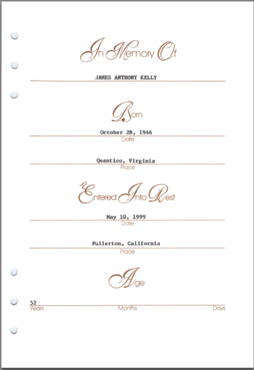
Yeah, I know, it’s a little weird, but it’s legit. My dad passed away when I was 20 (1999) and I’ve had a old newspaper clipping of his obituary in my possession since that time. Not long ago, I scanned it into Evernote and threw the paper clipping away. I also scanned in the pages and pages of handwritten names of people who came to his funeral, as well as the little program thing they gave everybody. I love that I’ll be able to show my kids not just a photo of their grandpa (whom they’ve never met), but the hundreds of people who came to pay their respects at his memorial.
My Son’s First Lost Tooth

My oldest, 6 years old as I write this, lost his first tooth a couple of months ago. This is a big-ish occasion for us as parents and a monumental rite of passage for my boy, so I snapped several photos of the little white tooth, the note the “tooth fairy” left for him and, of course his new and improved smile. All this stuff went straight into Evernote a few minutes after it happened, so when he’s older, I’ll be able to show him not only a series of photos marking the occasion, but the date, exact time and exact location. Remember, shit like this was—quite literally—impossible just a few years ago.
My Wife’s Engagement Ring Purchase Receipt
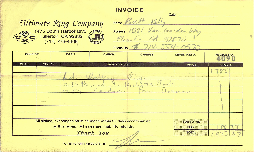
Marrying the little redheaded firecracker sitting a few feet away from me is one of my greatest victories as a man. I think back to walking around the jewelry store with her, helping her pick out the perfect ring that we couldn’t even kind of afford. It was a fantastic time and now I have a copy of the slip of paper we got along with the ring; a copy that will never fade, be misplaced or destroyed.
The Best Birthday Present I’ve Ever Received
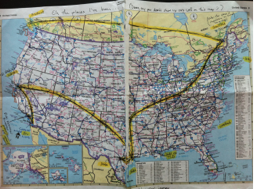
Roughly a decade ago, my wife and I were living in our first apartment not far from here. It was early November when I received a package in the mail; a letter-sized paper envelope that was busting at the seams. I opened it up and found a hodge-podge of Linux CDs, handwritten notes and other such things, but what really made my jaw hit the floor was a heavily scrawled-upon birthday card and the map, pictured to the right (click to see the bigger version)
This map represents the U-shaped path that this little care package had taken across North America and back. You see, several friends of mine from a (now defunct, sadly) IRC channel had gotten together and decided to do something for my birthday, so each of these guys would receive this package in the mail from the previous guy, sign a birthday card and mark their location on the map, include anything they felt like including and mail it to the next guy. After an absurd number of stops, it showed up at my door. Looking at this picture still wells me up a little bit because I’d never shaken the hand of any of these dudes, but they did this. I don’t ever want to forget that (and I won’t).
My Daughter’s First Ballet Dance Recital Thingie

(I don’t actually know if “recital” is the right word, but I digress)
My little girl is just about the most beautiful thing in the whole universe. I remember the day like it was yesterday, but it won’t be that way forever. Seeing her in her little costume, wearing a little bit of makeup for the first time and watching her four-year-old self out on stage and dancing for an auditorium full of people; that’s one of my proudest moments as a father and a cherished memory for me.
As you can probably guess by now, I’ve got oodles of photos and words describing what that day was like, all in Evernote where they’ll probably outlive me. What a gift to give my daughter when she’s grown that she can show her own husband and children.
###
I’ve talked before about how I use Evernote to build my own history book; a detailed account of my life that goes beyond a bunch of bank records, Jiffy Lube receipts and beer labels. I’m not just blowing smoke when I say that many of the most important moments in my life are safely housed in my trusty Evernote account, where one day I’ll be able to hand the whole mess over to the next generation of our family.
Call me stupid or whatever, but it brings me peace to know that so much of what’s important to me isn’t just shoved in some file box somewhere in a hall closet. Having all of it at my fingertips and taking casual strolls down memory lane is one of my favorite parts of using Evernote.
I like lists. Hell, I love lists. Between my obvious love affair with Evernote and the degree to which I trust OmniFocus, it’s quite apparent that productivity software is something I care about and which routinely captures my fancy.
So. Clear.
What do I think about Clear?
While in San Francisco last month for Macworld, I got a chance to briefly demo Clear (courtesy of the handsome Nik Fletcher of Realmac software). I have to say, my initial impressions were quite good. The app is clearly well thought-out and make exceptional use of iOS’s gesture-based interaction paradigm and, frankly, it’s gorgeously simple.
“But”, I thought to myself, “this isn’t going to supplant OmniFocus.” After all, the two apps are worlds apart and Clear, for everything it is, isn’t a GTD-style list-maker. It wasn’t meant to be one.
There are days when I just need a list; errands to run, chores to finish around the house, things to buy at the hardware store. I could drop these things into OmniFocus, sure, but the data is inherently transient and doesn’t really need a place in my Fortress of Productivity. This is typically where my trusty Pilot G2 Mini and Field Notes notebook would come into play. For one-off lists, analog tools are my go-to.
Clear is going to get a shot at that particular title.
The ease with which I can quickly compose a list of things is on par with any other app out there. It’s certainly faster than OmniFocus.
And I think that, because Clear deals exclusively in short, text-only chunks of information, the Realmac folks were able to optimize the living pudding out of the interface such that the user, once properly acclimated, could fly through it. There’s no background sync operation to wait for, no extraneous options to distract the user from the one thing Clear does. That’s the secret sauce here, if you ask me: pure speed.
My iPhone is just as ubiquitous as my pen and notebooks and—believe me—unless I’m sleeping, all three of these tools are in my pocket, almost without exception. Temporarily retiring the Field Notes notebook in favor of evaluating Clear isn’t going to be a huge leap for me. I can’t really give an opinion as to how I think it will pan out, but the Realmac guys make such great stuff that I can’t help but give it a go, nor can I help being optimistic.
So, that’s the deal—for the next couple of weeks, I’ll be putting Clear through it’s paces as my “incidental” list manager. If nothing else, it will be a marked improvement over my abysmal handwriting.
I’ll let you guys know how it goes.
Matt Gemmell, who sorta had me up until this point (regarding those “Tweet this to win a free bag of feces” promotions):
To argue that the promotion itself is alright, and that if the customer chooses to participate then it’s their own fault, is akin to denouncing cancer warning labels on cigarettes, or disagreeing with bans on cut-price alcohol promotions.
I certainly won’t argue that a portion of Internet marketing (and those perpetrating it) is off-putting and that it’s annoying to see people tooting about the new gadget they just entered to win, but absolving the participants and placing the blame squarely with those running the promotion tacitly makes two statements:
A marketer’s job is to sell things to people — so, it’s incumbent upon them to figure out the most effective way to do it. Nobody’s arguing that maybe these folks could be a little more scrupulous, but these marketing departments simply wouldn’t employ these tactics if they didn’t consistently produce results. It’s not illegal and it works, so they do it.
Yeah, it’s annoying when people toot about the free iPad 2 they just entered to win. But, if we really want to choke this problem off, then we should start with the (mostly) grown men and women who are perpetuating the problem with each and every “like” instead of admonishing the sleazy marketers of the world to somehow grow a conscience.
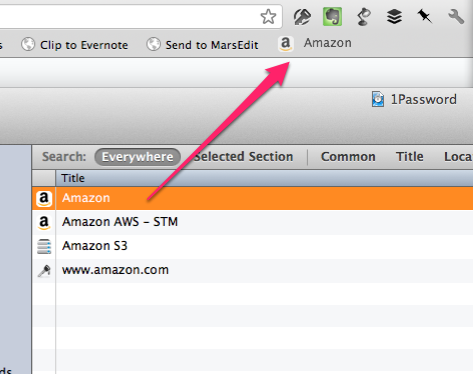
(Note: I heard this on an episode of Back to Work that was sponsored by Agile Bits, the makers of 1Password. I’m sad to say I didn’t discover this on my own and I wanted to credit those from whom I originally heard about it. Moving on…)
1Password is easily one of my most valued and utilized tools for the Mac. It makes it stupid easy to create and use unique, strong passwords across all of your Macs, as well as your iOS devices. If you’re not using it, then you really should be. Totally serious.
If you are, then here’s a little something that might just curl your hair a little bit.
Open the 1Password app on your Mac and click over to the Logins area. You’ll see a big ass list of all of the logins currently stored in 1Password (duh). Now, I want you to position the main 1Password window right next to your favorite web browser.
Next, click and drag one of your commonly used 1Password logins onto your browser’s bookmark bar, like this:
What the heck?
You just created a bookmark for a website that you commonly use, but now it will automatically fire up 1Password and fill in the login for you and—if you have it configured to automatically submit login forms—just log you right in.
With a single freaking click.
You guys have no bloody idea how much I use this.
(Note: if it’s been awhile since you entered your master password, you’ll be prompted to type that in, but the process will then continue as described above).
So there you go. I was a huge fan of 1Password before I learned about this little trick. Now I wish I could physically hug it.
Boom.
Daniel Wajda over at Swipe the Linen kindle invited me to share my iPhone 4S home screen along with some commentary about my choices in apps. Click on through if that sort of stuff is interesting to you (it totally is to me).
Factory work sucks, period. It will never not suck. Stop kidding yourself if you think it will… but also stop kidding yourself that these workers are being “abused”. No one is forcing them to work for Foxconn. No one is being “enslaved”; in fact, people line up by the thousands for the opportunity to work there.

 Hi, I'm Brett.
I write things here about technology, efficiency, business and other such like. Let's hope I don't screw it up. More about me